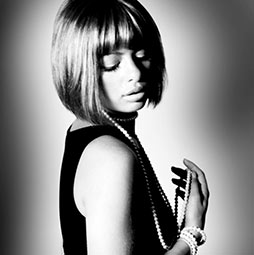
Black and white noir photograph effect in Photoshop
Film Noir (literally ‘black film or cinema’) was coined by French film critics (first by Nino Frank in 1946) who noticed the trend of how ‘dark’, downbeat and black the looks and themes were of many American crime and detective films released in France to theatres following the war, (Sourced from Filmsite.org)
There is a definite style to Film Noir, it’s not just black and white, bit its very contrasty with strong bold blacks in the shadows. In this Photoshop Tutorial, discover how you can add that Noir, cinematic touch to your photographs.
PS Don’t forget to follow us on Social Media for more tips.. (I've been posting some fun Instagram and Facebook Stories lately)
You can get my free Layer Blending modes ebook along with dozens of exclusive Photoshop Goodies here


Celebrating 25 years of PhotoshopCAFE with a new website Design

Top 3 Masking Tips for Photoshop I recently sat down with Jesus Ramirez and we shared our masking tips while...
How to get the best Black and White conversion in Lightroom in 2 minutes Here is a quick tip for...