
Page Peel effect in Photoshop, Surreal Composite, peel back the night
Surreal composite, page peel in Photoshop as well as day to night and combining layers
This Photoshop tutorial has it all; How to make a page peel, how to turn day into night, blending layers, how to cut out a person and add highlights and a whole lot more. Sometimes, a project like this is a great way to combine different techniques and learn how they all fit together. The hardest part for me, is coming up with ideas. If you guys have any ideas for composites, please drop them in the comments.

Here is the video that shows the tutorial
The pictures used come from Adobe Stock, you can grab them here.
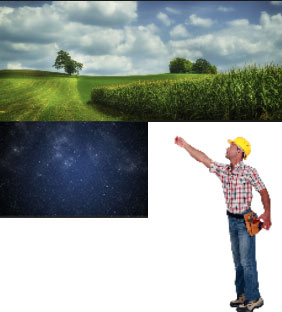
How to make”peel back the night”
There are a few steps in this tutorial. It’s all covered in detail in the video. I’ll give you timecode here, so that you can use this as an easy reference to come back to in the future, and jump to where you need. if you need to remember how it all goes 🙂
1:00. Open the images
1:40 Cut out the man and flip the image, so that he is facing the right
3:50 combine the photos so that the man is in the background.
5:03 Drop in the night sky
8:18 Blend the sky into the ground
8:25 Use a LUT adjustment layer to turn day into night
9:59 Use a mask to paint away the night in certain areas, to make it look like there is light shining on the man
12:31 Make the Page peel effect on the sky.
17:00 Cleaning up. Masking out his hands and some final color correction.
All of this is covered in the video!
Thanks for joining us here at the CAFE
Drop a comment and see you next week!
Colin
Recommended for this tutorial
Photoshop Compositing: Sky City Project. Photoshop 2026
Build a complete composite from start to finish and learn the techniques behind it.
$39.99 · one-time purchase · instant download

Free for you
The Photoshop Vault
Get my free Layer Blending Modes ebook along with dozens of exclusive Photoshop goodies: actions, brushes, presets and cheat sheets.
You're on the list, so your free goodies are waiting for you in the Vault.
Get Free Photoshop Goodies Open the Vault
Cutting out a photo from background & refine edge tutorial
Things have changed when it comes to removing objects from their backgrounds, extracting, masking or whatever you would like to call it.... Read tutorial
Cut out hair and difficult Images in Photoshop Tutorial
We will use Channels to help mask out a complex objects with clean edges. This technique will also save you a lot... Read tutorial
Photoshop 2020 1-click wonders. Quick tips to combine photos
5 Quick tips in Photoshop 2020 to combine images in Photoshop. Read tutorial
Blending layers in Photoshop, Double Exposure Tutorial
The intro to the hit TV show True Detective has everyone talking about the double exposure effect. I have made this tutorial... Read tutorial
Photoshop CC 2014, best new features for photographers
This tutorial touches on the best new features in the 2014 release of Photoshop CC and how to use them. This includes... Read tutorial











Just amazing man. Thanks for sharing your creativity.
Very nice tutorial.
Another great and cool tutorial, Colin.
Thanks once again for your work. I’m always learning something new from you. 😀
Hey, Colin how did you get involved into graphic design and all this work you do? Where and when did you get started? How do you come out with all these great ideas? I think it would be great to know more about you and I’m sure it would be of great inspiration to many, I’m sure.
You should seriously contemplate writing your “memoirs”.
Kudos. Very smooth delivery of a complex tutorial.
Love this tutorial because it has enhanced my understanding of blending modes and ways to use the program. Thanks.
I love love love love this as it can be used for other purposes such as book covers. So helpful Colin. Thank you a thousand times.
very nice. it looks like real.
Another great tutorial Colin. As usual learn a lot from every one I watch. Thank you.
That was fun! Thank you!
I like the idea of the “pull back’ effect, but I like the “real” look better than the “sur-real” look. You do some amazing things with real photos, so do you ever do real photo manipulation images. That is what I really like. I am sure you can do it. Can you do some photo manipulation videos? I know I would learn a few tricks from you. I always do.
Great tutorial in the vein of Erik Johansson- brilliant.
Thanks for all the kind comments!