
User Guide New PhotoshopCAFE Website – Celebrating 25 years
PhotoshopCAFE Website User Guide
Welcome to the New PhotoshopCAFE
Hi, I’m Colin Smith, founder of photoshopcafe.com. I’m thrilled to welcome you to the brand-new PhotoshopCAFE website!
This year marks our 25th anniversary, and we’ve celebrated with a complete rebuild of the site. Whether you’re brand new or one of the many CAFE Crew who’ve been visiting since day one, I’m so glad you’re here. Our mission remains the same: sharing world-class Photoshop and Lightroom training, always free of ads and always accessible.
We’ve now got over 700 tutorials, each with a written walkthrough and a video, all 100% free. And that’s just the beginning. Let me show you the exciting new features designed to make your learning experience smoother, faster, and more inspiring than ever.
Key Features of the New PhotoshopCAFE
Lightning-Fast Performance
-
Completely rebuilt with speed in mind. (Might be a bit slower on day 1 because everyone coming at once lol)
-
Fully responsive and liquid design—resize the window or use any device, and it looks great.
-
Cleaner, uncluttered layout for easy reading and browsing.
Tutorials Made Simple
-
Newest tutorials displayed front and center for quick access.
-
View All option to explore the complete library.
-
Optimized for mobile, making it quick and easy to navigate anywhere.
Smarter Search & Categories
-
Powerful search function at the top or side of the page.
-
Faster, more accurate results.
-
Tutorials organized by categories under the Free Tutorials menu—Photoshop, Lightroom, Camera Raw, and more.
Rich Tutorial Experience
-
Videos embedded directly into each tutorial page.
-
Full written steps for every lesson.
-
Share tutorials easily—whether via messaging apps, copying links, or social media.
-
Text scaling: expand the page to make reading easier if needed.
The PhotoshopCAFE Vault (Goodies)
-
Sign up with your email for exclusive access to downloadable resources.
-
Existing members go straight to downloads.
-
Double opt-in ensures no spam—just quality resources and updates.
Community & Comments
-
Updated comments system for better discussions.
-
I’m active in responding—your feedback and questions matter!
New Features Section (Formerly Superguides)
-
Clearer navigation: see all new Photoshop & Lightroom features as they’re released.
-
Sort by Photoshop only, Lightroom/Camera Raw, or even legacy features going back to CS3.
-
One of the most comprehensive feature archives available online.
️ Reviews & Tech for Creatives
-
Honest reviews of hardware and tools creatives use daily.
-
Categories include Wacom tablets, monitors, Macs, cameras, gimbals, mobile devices, and more.
Gallery & Inspiration
-
Browse My personal gallery.
-
Explore work across different categories hopefully provide some inspiration.
Premium Courses (Downloadable)
-
Easy access to all PhotoshopCAFE courses.
-
Filter by categories, read reviews, and preview what’s inside each course.
-
Built to complement the free tutorials with deeper, structured learning.
- Access to streaming versions if that what you prefer.
Help & Support
-
FAQ section under About to quickly solve common issues.
-
Friendly support if you get stuck along the way.
A Note of Thanks & What’s Next
PhotoshopCAFE has been a community hub for 25 years, and it’s only possible because of you. Whether you’re exploring your very first Photoshop tutorial or you’ve been with us since the early days, thank you for making this journey special.
When you sign up for the Vault, you’ll also get a weekly newsletter. Most weeks, it’s simply the latest free tutorial delivered straight to your inbox. Occasionally, I’ll let you know when a new course launches. That’s it—no spam, just great learning.
If you’re new here, welcome!
I can’t wait to hear what you think about the new site. Your feedback and suggestions help us keep improving. Until next time—
See you at the CAFE. ☕✨
Colin

Keep growing with Premium Courses
Photoshop 2026 for Digital Photographers
Learn Photoshop properly, from the basics to pro retouching, step by step.
$129.00 · one-time purchase · instant download

Free for you
The Photoshop Vault
Get my free Layer Blending Modes ebook along with dozens of exclusive Photoshop goodies: actions, brushes, presets and cheat sheets.
You're on the list, so your free goodies are waiting for you in the Vault.
Get Free Photoshop Goodies Open the Vault
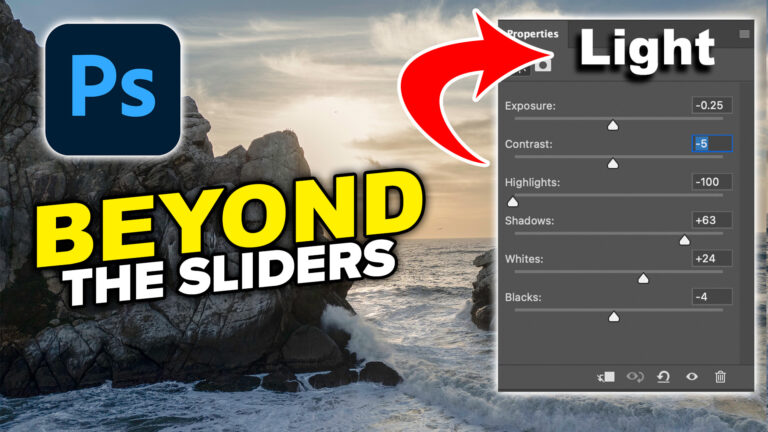
How to Use the Light Adjustment in Photoshop: In-Depth Guide
Colin Smith shows how to use Photoshop’s Light adjustment layer to recover highlights and shadows, control tone, use masks and stack adjustments. Read tutorial
How to use PhotoshopCAFE site features
Update September 01 2025 New Website We just launched a brand new site. The focus is on speed and ease of use.... Read tutorial
Hollywood style searchlight in Photoshop Tutorial
Create a hollywood style, spotlight effect. This tutorial came about as a result of a request from the forums. This effect will... Read tutorial
Kiosk Orbs
This Tutorial has come about due to a few requests. This starts with a fairly simple object, and finally ends up with... Read tutorial
Photoshop and Lightroom integration
Watch this video to discover how to best work between Photoshop and Lightroom. Find out how to keep your Lightroom adjustments fully... Read tutorial










Congratulations on 25 years of fantastic content. I’m reading “Photoshop 7 Trade Secrets” right now, a book I’ve had for many years, with a chapter by none other than Colin Smith! 2002, mind you. Good luck and keep up the great work; you keep me engaged. Perhaps one day I’ll be an artist, but in the meantime, I can still learn new tricks.
Thanks so much for the kind words. That’s when I first met Dave Cross, when we were both co-authors on that book!
I’ve been following your tutorials for years and have attended two of your in person seminars. You lay it all out in an easy to understand format, clearly spoken. I look forward to your Photoshop emails and new tutorials.
Thanks so much Rich, and thanks for your support over the years!
Thanks for all your tutorials over the years without them would have given up photoshop/lightroom years ago.
I’m so glad you didn’t give up!
Congratulations on 25 years of service for photographers and artists. Your expertise and generosity are much appreciated. Wishing you another 25 years of growth and sharing.
Thanks so much
Colin’s love for helping people shines through in all of his videos!!! Thank You SOOO much!
Thanks, I’m glad it comes through. Sometimes it feels awkward recording lol
Great work, Colin. I’m grateful for your Photoshop tutorials and teachings. Having followed your tutorials for several years, I appreciate the clarity you provide in those tutorials. I look forward to your Photoshop emails and new tutorials – thank you from a fellow Antipodean for sharing your knowledge and inspiring me along the way.
Thanks so much, my pleasure to share 🙂
congrats Colin. It’s been a joy watching you grow and provide so much of yourself to the world for free. Proud to be your friend. This site is incredible. May it bring you more success!
Thanks bud, you’ve been there since the beginning!
Have been following your cafe podcast for years, envious of your amazing knowledge. At my age (88!) and living in the country that is nowadays hated by everybody, your podcasts make me forget for a few minutes our terrible situation and concentrate in the wonders of this amazing site, explained by you. Thank you so very much!
Rachel, from Israel, waiting eagerly for peace all over!
Thanks, I’m happy to be able to bring some distraction. peace to the world.
Colin, your willingness to freely share your knowledge and expertise is greatly appreciated. Keep up the great work for another 25 years!
Thanks, yes, another 25!
Even in Israel you are popular: have been watching your podcasts for years, and admire your knowledge! Thank you for every podcast!
Thanks so much for watching, I really appreciate it.
Congratulations, Colin on 25 years. You are the best. I check out other tutorial sites, but ‘nobody tells it like you’. Keep up the great work.
You are too kind!
Just wanted to add to the other thank yous. I love your tutorials and videos and clear way that you explain everything. Great being part of the Photoshop Cafe community
Thanks, its great to have you at the CAFE
I have been following you for about a decade. I teach a basic photoshop course and always recommend your videos and courses. Congratulations and keep up the great work.
Thanks for the recommendations!
Hey, Colin, the site looks great and functions beautifully. Congrats on 25 years of Photoshop community and instruction. You rock.
Glad it’s working, hopefully not too slow, a lot of people visiting at once after the newsletter lol.
Congratulations on 25 years!!!
You’re tutorials are always absolutely the best!
Thanks, that’s great to hear
Wow! New website sounds great, I look forward to trying it all out. Thanks Colin.
I hope you enjoy it
Congratulations on the 25 years. Thank you for all the fantastic tutorials and info!!!!! Regards from South Africa.
Thanks so much
Colin- it’s amazing you do all this for free. I use your tips all the time and can’t imagine a better site for PS users. Hope you never give up!!!
Deepest regards and admiration
Tommy
Thanks so much!
Congratulations! I’ve liked your tutorials and classes for a long time. You helped get me through covid lockdown with your weekly online meetings. But if I had to pick one thing I like best – you publish transcript/text with pictures with your tutes. So when I kind of sort of remember something, and need to quickly find that one detail, I can find it in your written section and a still shot, pretty fast. Thank you.
I’m glad that the written steps help you!
Congratulations Colin and thank you for all the work you put in teaching us and the way you teach us. I hope you keep on doing it for a long time too.
Thanks so much!
Congratulations on 25 yrs of making the world safe for PS and LR! I also appreciate the written transcript that accompanies the tuts. It suits my way of learning. Carry on!!
Thanks so much!
love your tutorial
thanks so much
I’ve been following you since the beginning and could not have done it without your timely mails
Congratulations on 25 years of service to photographers. I’m from the UK and have been following you since I first subscribed to LR/PS. I find your tutorials very easy to follow for somebody like me (72 years old and not very computer literate). I never bother with other videos…if I’m looking for something and you don’t have a video, then it’s not worth knowing. Thank you so much and wish you every success for the future.
Thanks so much for the very kind words!