
All 5 DJI Intelligent Flight modes, tutorial and review
DJI introduced the Intelligent flight modes for the Phantom 3 and the Inspire 1 in a recent firmware update.
I took them out for a spin and show you how to use them all. There were some surprises and some fun, check it out.
Course Lock
(Part of the old IOC controls) The drone flies in a straight line (course) no matter what the orientation of the nose is. This allows for some unique shooting opportunities, with a lot of camera mobility, not much different than moving a camera out the side of a helicopter or out of an airplane.
Home Lock
Never lose your drone again. Pull the right lever towards you and the drone will come back to you no matter where it is or what direction it’s facing. You are the hub on a wheel and your drone revolves around you.
Follow Me
Your drone will follow (you) your GPS signal (Must have a wireless signal on your device for this to work). This is a great mode for anyone doing sports or any activity and wants an automated eye in the sky filming you.
Point Of Interest
You choose and object and your Phantom or Inspire 1 will orbit around it while keeping the camera pointed at it at all times. I was able to get some very fast and tight circles with this. Of course, you would normally want slow sweeping arcs for nice video.
Waypoints
The best till last. This is the most anticipated feature for quite some time. It’s a bit different than what I was expecting. It actually works more like the 3DR Cable Cam than the old Phantom 2 waypoints. Rather than adding points on the map, you fly to a point, and press a button on your controller to set the point. You then fly to the next point, and press then button again to set a 2nd, then 3rd.. point, etc. The copter will then fly between the points at a speed of your choosing. The camera can tween in an arc between points, or can be pointed forward at all times. It works very well and you can adjust the gimbal while flying, but you can’t yaw. 3DR Solo still has a 1-up with Cable cam, because it can automate Gimbal tilt, something that the DJI app cannot, at least at this time.
All our Premium Drone training is here:
I have been making best of class drone training videos since the very beginning and have amassed over 24 hours of training on Flying different drones, understanding the flight apps, strategies for getting great video and photos. These videos have all been shot on location in Southern California and the Hawaii Islands. I also have indepth tutorials on how to get the most form your images in Photoshop, Lightroom and Premiere Pro. Enjoy!
Why PhotoshopCAFE training?
Because this is something I do every day and Im passionate about it, I have written the book “The Photographer’s Guide to Drones” available in bookstores or Amazon. I am currently #1 on DJI’s SkyPixel community, an Adobe ACP and I preset this at the largest conferences and conventions around the USA. I have a lot of good stuff I want to share with you!
Original Phantom / Phantom 2 Training
Phantom 3 / Inspire 1 Training
Processing images and video (all drones, latests Adobe Photoshop, Lightroom, Premiere Pro)
Mavic training (coming soon)
Check out my series of videos that cover everything DJI and drones! The best way to learn to fly safely and shoot amazing photos and video. I also show my entire workflow for processing aware-winning photos and videos!

Check out my new book:
The Photographer’s Guide to Drones
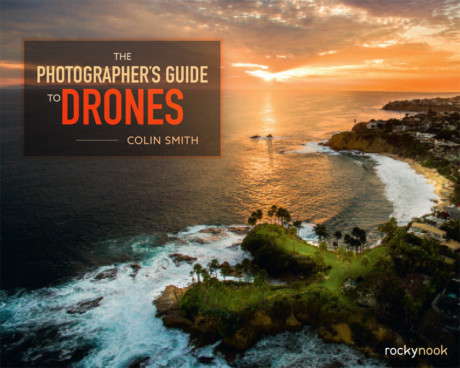
checkout at Rocky Nook’s website or Amazon

Keep growing with Premium Courses
Photoshop 2026 for Digital Photographers
Learn Photoshop properly, from the basics to pro retouching, step by step.
$129.00 · one-time purchase · instant download

Free for you
The Photoshop Vault
Get my free Layer Blending Modes ebook along with dozens of exclusive Photoshop goodies: actions, brushes, presets and cheat sheets.
You're on the list, so your free goodies are waiting for you in the Vault.
Get Free Photoshop Goodies Open the Vault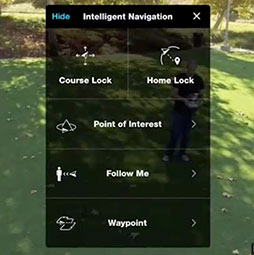
DJI Mavic 3 review, photo and video samples included
DJI Mavic 3 review and camera test, including low light Read tutorial
DJI Phantom 4 drone, tested. Video review
DJI Phantom 4 review by Colin Smith. Hands on test of object avoidance, object detection and follow, tap to fly and super... Read tutorial
DJI Phantom 4 vs Phantom 3 pro vs Inspire 1, Camera Comparison
Compare the Phantom 3 vs DJI Phantom 4 vs DJI inspire 1. All 3 flown at the same time. See the video... Read tutorial
DJI Mavic vs GoPro Karma which do I buy? Spec battle
DJI Mavic vs GoPro Karma. What is the best drone? Side by side comparison, compare specs, price and what comes with each,... Read tutorial
DJI Phantom 4 Pro Review, photo, video and flight test
DJI Phantom 4 Pro review. I have a Phantom 4 Pro prototype and have tested the camera and flight and here is... Read tutorial











Thanks for posting that Up Colin. Had a test of all the Flight Modes today and on my WiFi iPad I managed to get the Follow Me mode working by connecting my iPad to a Bluetooth GPS Receiver (A Dual XGPS 150). I already had the Bluetooth Receiver but getting an external Bluetooth GPS may be a way of getting owners who have WiFi only iPads to work with the DJI Go app 🙂
Thanks for the nice and informative post.