
Match Sunset color in less than a minute Photoshop Tutorial

Add a sunset in Photoshop
How to change a photo to look like a sunset in Photoshop.
Step 1
Open the image that you want to work with and also open any image of a sunset.
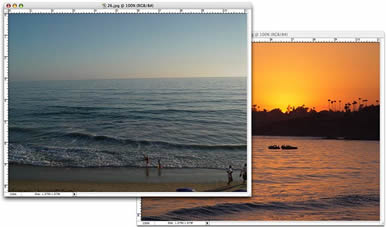
Step 2
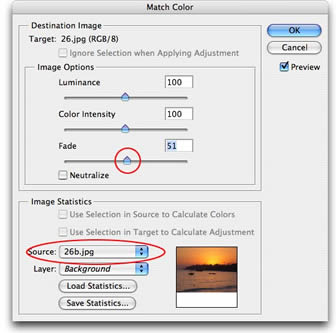
Choose Image>Adjustments>Match Color
The Match Color dialog box will open. We will only need to use 2 settings for the task at hand.
Under Source, click the drop down menu and select the image of the sunset. There will be a thumbnail for you to check that you have selected the correct image.
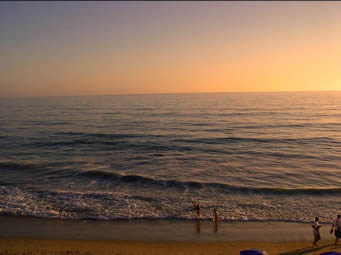
Turn on the preview option if it isn’t already. The working image will now take on the color attributes of the sunset image. Most probably the effect will be a bit too much.
Adjust the Fade slider until you are happy with the result. Move it to the left for more of the inherited color and to the right for the original color.
Luminance can also be adjusted if you see differences in the brightness of the images.
This tool can also be used when compositing multiple images in a layered document, where you will select the name of the layer the layer option.
Step 3
When you are satisfied, click the OK button to apply the changes. There are many things that can be done with this new filter including using the match color to remove a color cast in a single click.

Keep growing with Premium Courses
Photoshop 2026 for Digital Photographers
Learn Photoshop properly, from the basics to pro retouching, step by step.
$129.00 · one-time purchase · instant download

Free for you
The Photoshop Vault
Get my free Layer Blending Modes ebook along with dozens of exclusive Photoshop goodies: actions, brushes, presets and cheat sheets.
You're on the list, so your free goodies are waiting for you in the Vault.
Get Free Photoshop Goodies Open the Vault
How to make the colors match between different photos in Photoshop
Learn how to make the colors look the same on different photos on different layers in Photoshop. This is a very requested... Read tutorial
Turn a photo into a pencil sketch in Photoshop tutorial
In this photoshop tutorial you will learn how to turn a photo into a sketch. Its easy to get a pencil sketch... Read tutorial
How to use the Puppet Warp Tool in photoshop Tutorial
Learn how to reshape animals and people with the puppet warp tool in Photoshop. This tutorial shows you the best settings to... Read tutorial
How to combine photos in Photoshop for beginners
How to combine images in Photoshop for beginners. Read tutorial
Secret setting in Harmonization, to match colors between photos in Photoshop
An essential, but unknown tip for using Harmonization to match colors between layers in Photoshop. Match image color in Photoshop composites. Read tutorial











Great and quick tutorial for a super effect – Thanks.
Thank you so much! Most of the landscapes I take are in the golden hour, but not always. This helps to get the lighting at the right level to match the scene or improve it. I might have missed this, so thank you for offering these tips!