
3D Cubes Photoshop Tutorial
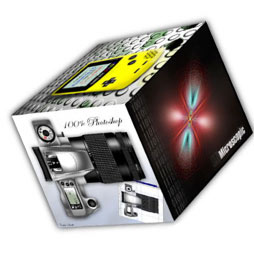
If you are looking for skills that will help you in creating cubes, and understanding gradients etc, this tutorial is perfect for you. However, if you are wanting to make 3D photo cubes, I have written a new tutorial that let’s you use the 3D features in Photoshop to make this effect much quicker.
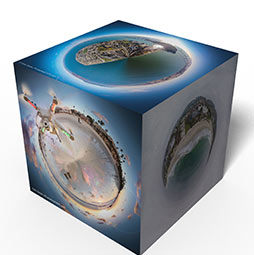
Otherwise, read on!
Step 1
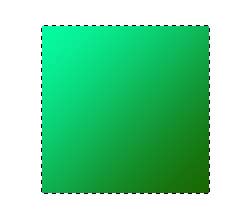 Start with a square. Here I made a new document 300X300, created a new layer and filled it with a gradient.
Step 2
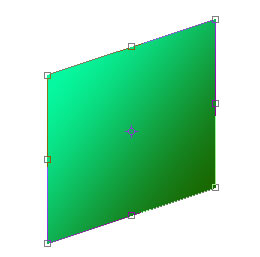 Press Crtl/Cmd+T to enter free-transform mode.
Right click/Cmd click… when the dropdown menu appears, select SKEW
Click on the right middle square and drag up until you get your desired angle. Press Enter/return to apply the transformation.
Step 3
 Duplicate the layer
Step 4
 Enter free transform again (Ctrl/Cmd+t) Right click and this time select FLIP HORIZONTAL.
Drag out the copy to the left. Hold down the shift key to keep the baselines aligned.
You may also want to make this side a bit thinner by clicking the left middle square (node) and drag it in a little bit.
Step 5
 Create a new layer and make another square and fill it with the same gradient, this time make the lightest color at the bottom left.
Step 6
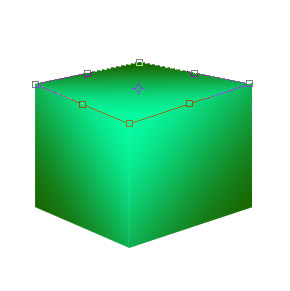 This time while in the free transform mode… when you right click/Cmd click select DISTORT
drag each corner until you get a good match. Be sure the corners fit nice and snug. This step will take a bit of practice to master.
Step 7
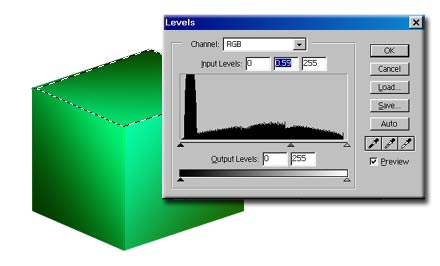 Finally select the top of the cube.
Image>adjust>LEVELS slide the middle triangle over to the right to darken up the mid-tones. Repeat for the left side. This step adds more realistic lighting to the cube.
Step 8
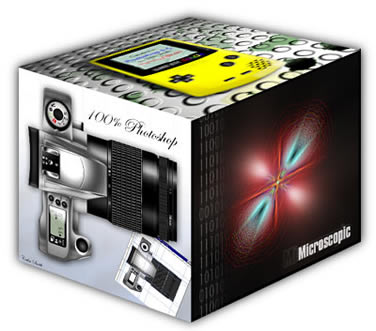 Ta-da A complete cube. Don’t limit yourself to just cubes. You can use this effect for all kinds of shapes. You can even construct a cube out of pictures. Just use images instead of the gradients.

Keep growing with Premium Courses
Photoshop 2026 for Digital Photographers
Learn Photoshop properly, from the basics to pro retouching, step by step.
$129.00 · one-time purchase · instant download

Free for you
The Photoshop Vault
Get my free Layer Blending Modes ebook along with dozens of exclusive Photoshop goodies: actions, brushes, presets and cheat sheets.
You're on the list, so your free goodies are waiting for you in the Vault.
Get Free Photoshop Goodies Open the Vault
Create Realistic Lightning in Photoshop Tutorial
Here is a nice little tutorial to show you how to electrify your images with lightning in Photoshop. This spooky graveyard will... Read tutorial
Creating Starburst glints of light in Photoshop Photoshop Tutorial
Here is a nice effect that looks like the sun glinting off a metallic or shiny surface. This starburst effect even includes... Read tutorial
Placing a person inside a picture Photoshop Tutorial
In this tutorial I will demonstrate how to place a person inside an image using the "paste into" command. You can use... Read tutorial
Hollywood style searchlight in Photoshop Tutorial
Create a hollywood style, spotlight effect. This tutorial came about as a result of a request from the forums. This effect will... Read tutorial
Kiosk Orbs
This Tutorial has come about due to a few requests. This starts with a fairly simple object, and finally ends up with... Read tutorial











that was easy. thanx 🙂
Glad to hear it!
how to make rounded angles in this case?
Thanks
Nice tutorial, and quiet comprehensive
The video to make the 3D photo cube in PS was awesome! But I’ve been working for days on trying to make it rotate and the closest I can get is for it to jump around and move in crazy directions. I think the key is the Y axis Colin mentioned, but I can’t figure out what to do to it. Can someone help me out? I’ve tried everything I can think of! I’m now sleep deprived. LOL Seriously.
Thank you.