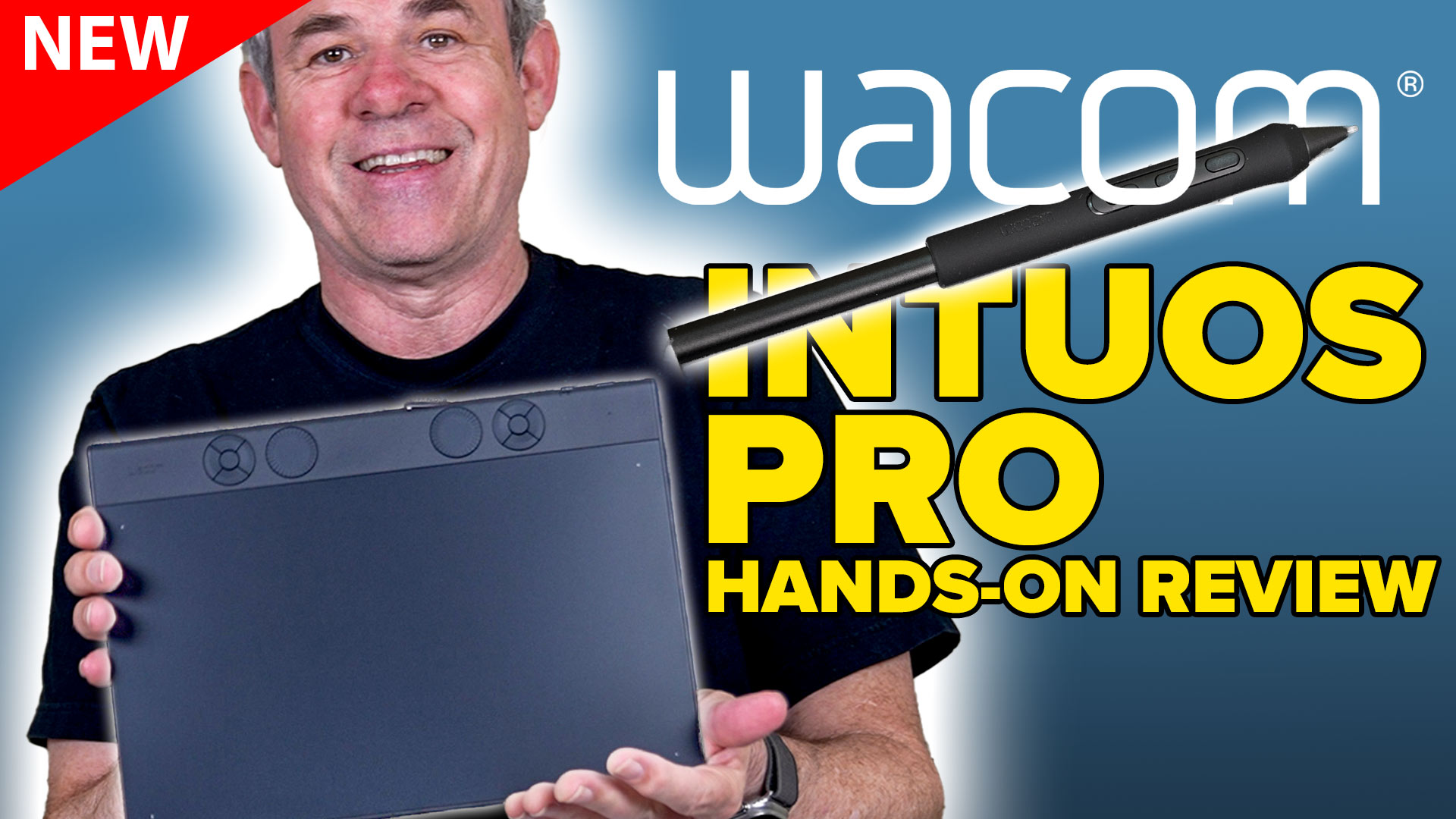
New 2025 Wacom Intuos Pro hands on review
Wacom Intuos Pro (2025) Review: A Love Letter to Precision (with a Few Scribbles in the Margins)
So, I finally got my hands on the newly redesigned Wacom Intuos Pro, and let me tell you, it’s like meeting an old friend who’s had a glow-up. This tablet is sleeker, smarter, and somehow both familiar and refreshingly new.
Design & Build: Slimmer, Yet More Spacious
First off, the tablet’s footprint has shrunk, but don’t let that fool you. The active drawing area has actually expanded, giving you more room to let your creativity run wild. The new sloped design, tapering from about 7mm to a mere 4mm at the front, makes for a comfortable resting spot for your hand, reducing fatigue during those marathon drawing sessions
ExpressKeys & Dials: A Mixed Bag
Wacom has moved the customizable ExpressKeys and replaced the touch ring with mechanical dials. The dials are a tactile delight, offering precise control over functions like zoom and brush size . However, the new top placement of the ExpressKeys might take some getting used to, especially if you’re accustomed to the previous layout. You can configure them to be at the bottom or sides, as you can rotate the tablet 4 ways and set the orientation in the new software.
Performance: Smooth Sailing
Equipped with the Wacom Pro Pen 3, boasting 8,192 levels of pressure sensitivity and enhanced tilt recognition, the tablet responds to every nuance of your stroke. Whether you’re sketching delicate lines or applying heavy shading.
Connectivity & Compatibility: Versatile and Reliable
The Intuos Pro offers both USB-C and dual Bluetooth 5.3 connectivity, with up to 16 hours of battery life on a full charge . It’s compatible with Windows 10 and macOS 13 or later. It comes with a newly designed Wacom center for settings up all the functions. The video shows the basics on how to use this.
Final Thoughts: A Worthy Upgrade with Minor Quirks
The 2025 Wacom Intuos Pro is a testament to minimum size and weight, While the new ExpressKey placement may require an adjustment period, the overall enhancements in design, functionality, and responsiveness make it a compelling choice for creatives seeking a reliable and refined drawing tablet. Also noting the multi-touch has been removed. Wacom have said they polled the users and most users didn’t like multi-touch and turned it off. This also allows them to keep the pice the same as the previous versions. Available in Small, Medium and Large sizes.
Official Wacom Product page here
Note: this is an affiliate link and PhotoshopCAFE will make a commission if you purchase from this link. (Thanks for the support).
Thanks
Colin

Keep growing with Premium Courses
Photoshop 2026 for Digital Photographers
Learn Photoshop properly, from the basics to pro retouching, step by step.
$129.00 · one-time purchase · instant download

Free for you
The Photoshop Vault
Get my free Layer Blending Modes ebook along with dozens of exclusive Photoshop goodies: actions, brushes, presets and cheat sheets.
You're on the list, so your free goodies are waiting for you in the Vault.
Get Free Photoshop Goodies Open the Vault
Wacom Pro pen tablet review 2017
Wacom Intuos Pro Medium review. Intuos Pro Large Paper Edition unboxing and setup. See the features in the New Wacom Intuos pro... Read tutorial
Wacom Intuos Pro Small pen tablet review and setup
Wacom Intuos Pro Small review. In depth Wacom tablet setup tutorial. Read tutorial
Wacom Cintiq 16 review. An inexpensive Pen display from Wacom
16 inch Cintiq for only $650. Check out my in-depth review of the new Wacom 16 Pen display. pressure sensitive drawing, directly... Read tutorial
How to edit a photo in Photoshop using Pen Pressure & Wacom Tablet
How to use Pen Pressure to Edit photos in Photoshop with a Wacom Tablet. Read tutorial
Wacom One Pen Display hands on Review
Wacom One Creative Pen Display, hands-on in-depth review and recommendations. Read tutorial