
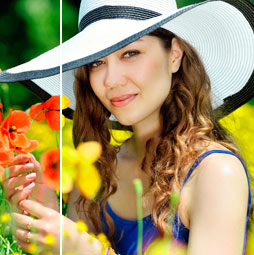
The difference between Saturation and vibrance in Photoshop. How to use both together for the best results
Difference between Vibrance and Saturation in Photoshop, Lightroom and ACR

Keep growing with Premium Courses
Photoshop 2026 for Digital Photographers
Learn Photoshop properly, from the basics to pro retouching, step by step.
$129.00 · one-time purchase · instant download

Free for you
The Photoshop Vault
Get my free Layer Blending Modes ebook along with dozens of exclusive Photoshop goodies: actions, brushes, presets and cheat sheets.
You're on the list, so your free goodies are waiting for you in the Vault.
Get Free Photoshop Goodies Open the Vault

Photoshop and Lightroom integration
Watch this video to discover how to best work between Photoshop and Lightroom. Find out how to keep your Lightroom adjustments fully... Read tutorial
An Intro to Actions and Photoshop Automation Photoshop Tutorial
A couple of years ago, some Action enthusiast friends of mine expressed their concern that I was pursuing a vapor, a ghost,... Read tutorial
Generating Actions of your own Photoshop Tutorial
How to make your own Photoshop actions. Generating Actions of your Own, Photoshop Tutorial. I'm going to walk through the process I... Read tutorial
Getting started with Layer styles, Photoshop Tutorial
Maybe you are unfamiliar with Layer Styles as yet, and so I'll cover them briefly. Layer Styles are simply groups of commands... Read tutorial
Metal and Glass Layer style basics in Photoshop
Nearly anyone can create a bevel on type, but not many realize that from this foundation we can create glass, plastic, metal,... Read tutorial









Loved it. I had not learned the difference between Vibe and Sat, or how they work together. Very valuable. Thank you.
Thanks, I am primarily a Lightroom user and I’ve used these two together but never tried the Saturation negative to control the blowout of colored objects…. this tip will allow an even finer control of my photos…. thanks again and Happy Holidays
Thank you. This really helped me understand the options better
I appreciated this simple, basic, and clear explanation of vibrance/saturation–something I played with without understanding. I’ll likely go back and play with some pictures I thought I had completed 🙂 You’re a fine teacher, Chris–this coming from someone with over 50 years in education! Thank you.
It was really a great video.
learned a lot of how they work especially in combination.
Will try asap
Helpful. I’m sure I’ll use the info.
Thank You! I didn’t really know how to use them in this way. These are the kinds of tips that are seriously useful. Not just what a tool does, but how to use it and when to use it compared with other tools that can accomplish similiar tasks.
Hey Colin
I have been trying to find the LIKE button to no avail. I wanted to let you know that your tutorials have been extremely helpful to me.
So where’s the like button.
Cheers
Pat
The like button is on youtube 🙂
Hi Colin. Good explanation of the two. Also, I knew about the Vibrance slider work with unsaturated colors, but I like your idea of working them both together. Thanks
Dennis
Clear explanation with an easy-to-understand demonstration.
Great video. Learned a lot how they work together. Have a merry Christmas and a safe and happy New Year.
Johnny
Well done! Your videos are appreciated and educational. You are like a personal mentor.
Super well illustrated dear mr Colin
I’ve seen tutorials about this before BUT there’s so much to remember. I enjoy being able to refresh my knowledge and you do a good job of that. Do you have a tutorial on when or why it is best to use either Lr, Ps, or ACR?
Search for Lightroom vs Bridge
This is very interesting & certainly opening new doors.
Hi Colin.
I have learnt so much from you tutorials and it is tips like this one that really are so helpful in getting the best out of my pictures
Learned some very useful information about saturation and vibrancy. I have used both before but now I see how they can be used effectively, and I see the ways to measure each one for the optimal image.
Thank you. I now have a better knowledge of the use of the vibrance and saturation sliders and hope to put them to better use than I have done in the past
Another excellent and practical lesson – thank you Colin I have learnt so much from your videos!
Very useful tutorial ! Thank you Colin.
As usual very interesting and enlightening. This tut gave me a new perspective on the vibrance slider. Thanks Colin and happy Christmas.
Yes, I really like your explanation using these two sliders. It will help me in the future in dealing with adjusting colors in my photos.
Excellent video. You are very informative and an excellent teacher. With my short attention span, the short ones are perfect! I usually experiment with these two sliders but didn’t recognize how they work together. Thank you.
Really informative. I’ve just been using vibrance and rarely doing anything with saturation. This is a real game changer for me. Thank you, Colin. I always look forward to your videos.
Thanks Colin, As always, I enjoy your clean presentation of the tools we can use in editing images.
You explanation was extremely good. You gave some good tips!
That you Colin for a clear and simple explanation.
That was a good explanation. Thank you.
Thanks, Colin, always wondered what the difference was.
As always, great and useful tips. Thanks
Great video! I never used the saturation slider, just the vibrance. Now I will use them both.
Interesting and informative. Thanks. Will inform workflow
Thanks, that answered the questions I had about the two.
Very useful. ihave being doing things wrongly in the past but look forowardto improving some of my images now!
Very useful. I have being doing things wrongly in the past but look forowardto improving some of my images now!
Great job, you made it so clear. And I didn’t know about resetting them with the double click, that will be helpful.
Thanks Colin vibrance finally makes sense. Using both together makes a great tool.
Hi Colin,
Very helpful explanation.
Cheers from OCMMA!
Hello Colin,
Clear explanation, a good job as always.
Terry from OCMMA
Colin, you make using common sliders into new and creative ways of dealing with colour. You have taught me more unique ways of using Lightroom and Photoshop than any other online teacher. Kudos to you !!
Hi Colin. I like how you explain in basic terms for newbies like me. However, I am feeling quite confused about the layers and masks and how to use them. I also wonder which plug-ins I need. Mobile photography is strictly a new hobby for me and I do not intend to create a business with my photos.
I have made a beginners tutorial on layers and another on masks. Look at the Photoshop basics category here at the CAFE and ou can easily find them/
O.K. that finally helps me to use these tools properly. Before I would use one or the other and then try and use brushes to adjust to where I wanted to be. thanks for keeping it simple
another excellent video as always, I’ve learnt much more since watching the videos
Is this how portraits can almost look B&W except for the eye color? BTW, I just purchased your drone photography book (and can’t wait to utilize some of the ideas) and that’s what brought me here!
This is one way of achieving that effect. I have other tutorials on partial color, check those out too. Welcome to the CAFE